
Custom Fitness Avatar Production Requirements
Plan a custom fitness avatar for your app: character design, rig requirements, movement tests, export files and approvals. Build a practical production brief.
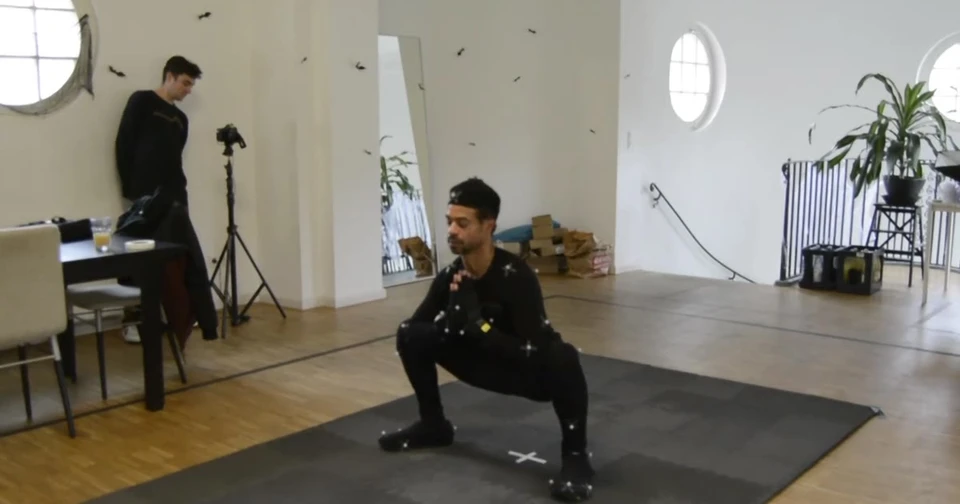
What does a studio need to build a custom fitness avatar for your app?
A custom fitness avatar needs more than a character reference. Before production, agree its role, appearance, movement range, rig, target platform, delivery files and approval process. A clear specification helps your product team review the same asset the studio is actually building, rather than discovering incompatible assumptions at handoff.
This guide is for fitness brands, app developers and creative teams commissioning a digital character. It focuses on production requirements and acceptance decisions. For a separate comparison of how movement is created, read our motion capture vs keyframe animation guide. Neither a polished avatar nor recorded movement establishes that a workout is appropriate for an individual user.
Table of Contents
Define the fitness avatar's role and delivery platform
Start with one sentence describing the job: for example, a branded character demonstrating an approved movement library in a mobile app. Then identify what the character must actually do. A non-interactive video presenter, a real-time exercise demonstrator and a conversational interface require different assets and different product work. Naming that distinction early makes a proposal easier to assess.
Specify the receiving environment before agreeing the model. Ask the development lead for the engine or playback system, its version, the minimum devices and the intended camera distance. A close-up presenter needs different facial detail from a small full-body figure. Portrait and landscape layouts can also change what remains visible when instructions, timers and navigation surround the character.
Separate visual production from behaviour. An avatar can show predetermined demonstrations without using AI. Conversation, personalised programme selection, voice recognition and camera-based assessment are separate features to scope with the people responsible for them. The custom virtual fitness coach service explains how the character-production scope is defined around an experience.
Give each decision an owner. The brand team approves identity; the developer approves technical compatibility; a qualified movement lead approves the demonstrations and exercise content. Decide who resolves a conflict when a brand pose looks attractive but makes a contact point hard to read. One named approval owner for each workstream prevents contradictory feedback from accumulating.
Describe the primary audience and the avatar's visible tasks.
Confirm rendered video, real-time playback or a specified combination.
List the target platforms, supported devices and important camera views.
Identify the development, brand and movement-review contacts.
Separate launch requirements from optional future features.
For a hypothetical first release, a team might choose one character, one outfit and a small representative set of movements. That is a planning example, not a recommended clip count or a published client specification. The useful question is whether the sample exposes the difficult requirements before the full library begins.
Prepare the character design, clothing and source assets

Supply references that describe the whole character, not just the face. Front, side and rear views help explain proportions, clothing, footwear and silhouette. Include brand colours and references for the intended visual style. Mark which details are essential and which can change after a technical review. This gives the studio room to solve production constraints without drifting from the identity.
State what already exists. A drawing, a sculpt, a textured model and an animation-ready character represent different starting points. If you have a model, share the available file formats, texture files, rig documentation and licence information. Avoid assuming that an attractive still render includes a reusable skeleton or editable production files. A short asset review should establish what can be retained.
Clothing needs its own decisions. Close-fitting sportswear, loose sleeves and layered garments can behave differently through arm raises, bends and floor movements. Explain whether the outfit is part of the character mesh, a separate asset or a planned interchangeable option. Ask how intersections will be reviewed at the poses the audience sees. Detailed cloth simulation is a separate requirement to discuss, not an automatic inclusion.
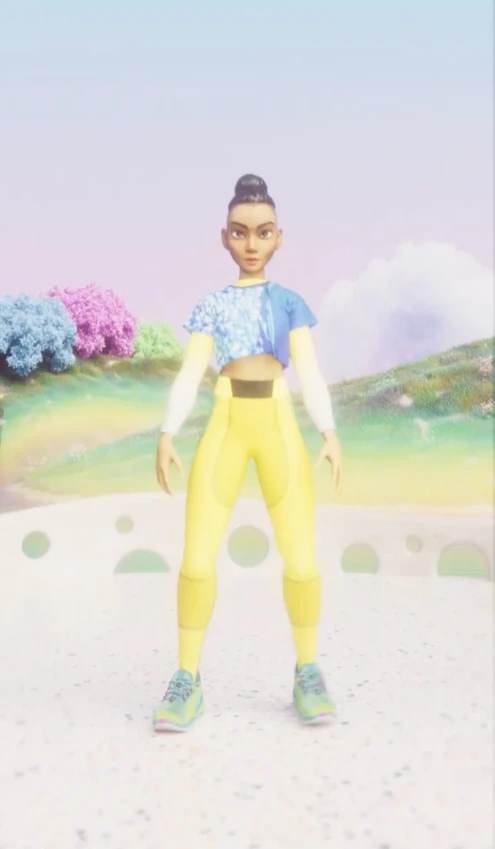
A genuine example is Spark Fitness. Mimic Productions' published Spark project credit lists character creation, modelling, texturing and rigging for Luni's mobile app. This documents character-production experience; it does not establish a clinical outcome or prove a particular animation method was used. The accompanying Spark artwork illustrates the finished visual character, not a technical rig inspection.
Set a design approval gate before detailed rigging. Review the silhouette at the actual app size, the visibility of limbs against the background and the appearance of clothing from required viewpoints. If body proportions change after the rig and animation library are built, further adaptation may be needed. Agree how those changes will be estimated and approved.
The AI avatar production overview provides the wider service context. For a fitness brief, keep attention on the character's specific role and visible movement requirements rather than adding unrelated capabilities because another avatar product offers them.
Specify the rig and representative movement tests
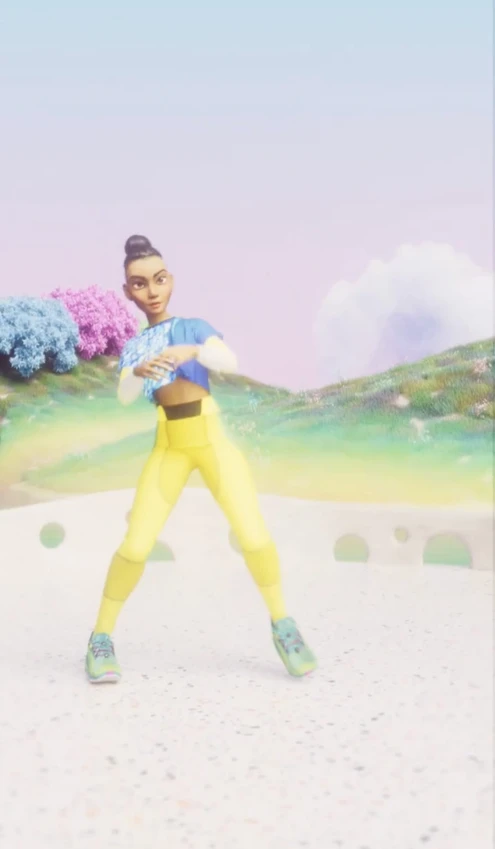
A rig defines how the character can be posed and animated. The brief should identify the receiving skeleton conventions, reference pose, scale, orientation and any existing animation library that must work with it. Distinguish the animator's working controls from the skeleton and data required by the app. Delivering one does not necessarily deliver the other.
Engine compatibility needs an actual import test. In Unity's humanoid model import guidance, bone mapping is part of configuring an Avatar for animation playback. Agree with your developer whether that workflow suits the character, and verify the mapping on the delivered asset. A file extension alone does not demonstrate compatibility.
Choose movements that expose the intended range. If the product includes floor work, review hands and feet against the ground. If it includes overhead reaches or deep bends, examine shoulders, hips, knees and clothing in those positions. Use approved references and the intended viewing angles. A character that looks correct in a neutral pose can still need work when its mesh deforms during movement.
Keep a written acceptance list for the sample. For example: the developer can import it using the agreed settings; visible contacts remain consistent in the approved view; clothing intersections are reviewed; required start and end states are identified; and any remaining limitations are documented. These are production checks, not a substitute for professional exercise assessment.
If an existing library must transfer to a new body, include representative clips in the review. Different proportions and skeletons can require retargeting and adjustments. Test the most demanding examples before assuming the entire library will transfer unchanged. Our fitness animation service covers movement production around an agreed character and platform.
Also describe interaction between clips. A list of isolated exercise names does not specify entry poses, exits, pauses or transitions. Decide whether the app needs a continuous character, individually triggered clips or rendered sequences. The studio technology page gives background on performance capture, while the previous comparison article addresses method selection in more detail.
Agree exports, rights and the acceptance handoff

Write the handoff package before approving full production. Separate models, textures, skeletons, animation clips, rendered videos and editable source files. Specify which are included, how they are named and which person tests each deliverable. If the app team requires an engine project, import preset or demonstration scene, include that requirement in the quote rather than assuming it accompanies the assets.
Confirm versions with the receiving developer. Epic's skeletal mesh pipeline documentation describes a version-specific FBX workflow. Your team should agree the relevant exporter and importer settings for its own engine version. Treat a successful sample import and playback review as the evidence, not a broad promise of universal engine support.
Set performance requirements in context. Ask the developer to define appropriate limits for geometry, materials, textures, bones and blend shapes, together with the devices and scene used for testing. There is no single polygon count that guarantees an acceptable experience on every phone. Review the character inside a representative app build with the intended lighting, interface and animation playback.
Make revisions traceable. Record the asset version, reviewer, observed issue and approval decision. Separate a correction to the agreed brief from a new outfit, different proportions or an additional expression set. List review rounds and who can authorise scope changes. This keeps discussions about production cost grounded in deliverables rather than an unexplained price per character.
Discuss usage rights, third-party components and future editing before handoff. Ask which deliverables you may modify, where they may be used and what source files are supplied. If a likeness, voice or outside asset is involved, confirm the necessary permissions with the responsible parties. Do not assume that buying an asset transfers every underlying right; record the agreed terms in the project contract.
Your final brief can be compact. Include the avatar's role, approved design references, asset inventory, platform specification, movement sample, deliverable list, review owners, timing and budget range. Use our animation briefing guide for a broader approval framework, adapting the product-specific parts to character production. Send the package through the project enquiry form without including sensitive personal or health information.
Frequently asked questions
What should a custom fitness avatar brief include?
Include the character's role, visual references, existing assets, target platform, rig and movement requirements, delivery files and approval owners. Add launch timing, a budget range and any required usage rights. A small representative test should have clear acceptance criteria before the complete library is commissioned.
Can we use an existing character instead of building a new one?
Possibly. Supply the model, textures, skeleton, available source files and usage permissions for review. The studio and app developer need to establish whether the asset can meet the planned movements and platform requirements, and which preparation work belongs in the scope.
Does a fitness avatar need artificial intelligence?
No. A character can play approved exercise demonstrations or scripted messages without an AI system. If conversation or adaptive behaviour is required, specify it as an additional product capability with its own integration, content and evaluation responsibilities.
Which file format should we request?
Ask the receiving developer to specify the format, version, skeleton conventions and import settings. FBX may be appropriate for a particular pipeline, while rendered video or another agreed format may suit a different experience. Include a sample import test before approving the delivery specification.
Can one movement library work with several avatars?
It may be possible, but it needs testing. Character proportions, skeleton mapping, contact points and clothing can affect the transferred result. Include representative movements and every planned body variant in the technical review before assuming that no additional adjustment is needed.
What determines the cost of a custom fitness avatar?
Design complexity, model readiness, clothing, rig requirements, facial performance, character variants, movement adaptation and delivery requirements all influence the scope. Review rounds and editable source files also matter. Request an itemised proposal tied to clear deliverables rather than relying on a universal price.
Who should approve the exercise demonstrations?
Your qualified movement specialist should review the exercise content and demonstrated technique for the intended use. Brand and technical reviewers have different responsibilities. An animation-production approval does not certify a workout as safe for every person or establish medical effectiveness.
How should we handle future outfits or character updates?
Describe likely variants during the brief, then agree what is included at launch. Ask how new meshes, textures and proportions would affect the rig, existing movement library and testing. Keep versioned assets and documentation so later changes can be reviewed against a known baseline.
Conclusion
A useful fitness-avatar specification connects design decisions to the app that will receive the character. Define the role, review available assets, test the rig with meaningful movements and agree the export package before expanding production. This creates a practical basis for comparing proposals and approving finished work.
Planning a character for your app? Explore our custom virtual fitness coach production and share your platform, references and movement requirements with the team.
What does a studio need to build a custom fitness avatar for your app?
A custom fitness avatar needs more than a character reference. Before production, agree its role, appearance, movement range, rig, target platform, delivery files and approval process. A clear specification helps your product team review the same asset the studio is actually building, rather than discovering incompatible assumptions at handoff.
This guide is for fitness brands, app developers and creative teams commissioning a digital character. It focuses on production requirements and acceptance decisions. For a separate comparison of how movement is created, read our motion capture vs keyframe animation guide. Neither a polished avatar nor recorded movement establishes that a workout is appropriate for an individual user.
Table of Contents
Define the fitness avatar's role and delivery platform
Start with one sentence describing the job: for example, a branded character demonstrating an approved movement library in a mobile app. Then identify what the character must actually do. A non-interactive video presenter, a real-time exercise demonstrator and a conversational interface require different assets and different product work. Naming that distinction early makes a proposal easier to assess.
Specify the receiving environment before agreeing the model. Ask the development lead for the engine or playback system, its version, the minimum devices and the intended camera distance. A close-up presenter needs different facial detail from a small full-body figure. Portrait and landscape layouts can also change what remains visible when instructions, timers and navigation surround the character.
Separate visual production from behaviour. An avatar can show predetermined demonstrations without using AI. Conversation, personalised programme selection, voice recognition and camera-based assessment are separate features to scope with the people responsible for them. The custom virtual fitness coach service explains how the character-production scope is defined around an experience.
Give each decision an owner. The brand team approves identity; the developer approves technical compatibility; a qualified movement lead approves the demonstrations and exercise content. Decide who resolves a conflict when a brand pose looks attractive but makes a contact point hard to read. One named approval owner for each workstream prevents contradictory feedback from accumulating.
Describe the primary audience and the avatar's visible tasks.
Confirm rendered video, real-time playback or a specified combination.
List the target platforms, supported devices and important camera views.
Identify the development, brand and movement-review contacts.
Separate launch requirements from optional future features.
For a hypothetical first release, a team might choose one character, one outfit and a small representative set of movements. That is a planning example, not a recommended clip count or a published client specification. The useful question is whether the sample exposes the difficult requirements before the full library begins.
Prepare the character design, clothing and source assets
Supply references that describe the whole character, not just the face. Front, side and rear views help explain proportions, clothing, footwear and silhouette. Include brand colours and references for the intended visual style. Mark which details are essential and which can change after a technical review. This gives the studio room to solve production constraints without drifting from the identity.
State what already exists. A drawing, a sculpt, a textured model and an animation-ready character represent different starting points. If you have a model, share the available file formats, texture files, rig documentation and licence information. Avoid assuming that an attractive still render includes a reusable skeleton or editable production files. A short asset review should establish what can be retained.
Clothing needs its own decisions. Close-fitting sportswear, loose sleeves and layered garments can behave differently through arm raises, bends and floor movements. Explain whether the outfit is part of the character mesh, a separate asset or a planned interchangeable option. Ask how intersections will be reviewed at the poses the audience sees. Detailed cloth simulation is a separate requirement to discuss, not an automatic inclusion.
A genuine example is Spark Fitness. Mimic Productions' published Spark project credit lists character creation, modelling, texturing and rigging for Luni's mobile app. This documents character-production experience; it does not establish a clinical outcome or prove a particular animation method was used. The accompanying Spark artwork illustrates the finished visual character, not a technical rig inspection.
Set a design approval gate before detailed rigging. Review the silhouette at the actual app size, the visibility of limbs against the background and the appearance of clothing from required viewpoints. If body proportions change after the rig and animation library are built, further adaptation may be needed. Agree how those changes will be estimated and approved.
The AI avatar production overview provides the wider service context. For a fitness brief, keep attention on the character's specific role and visible movement requirements rather than adding unrelated capabilities because another avatar product offers them.
Specify the rig and representative movement tests
A rig defines how the character can be posed and animated. The brief should identify the receiving skeleton conventions, reference pose, scale, orientation and any existing animation library that must work with it. Distinguish the animator's working controls from the skeleton and data required by the app. Delivering one does not necessarily deliver the other.
Engine compatibility needs an actual import test. In Unity's humanoid model import guidance, bone mapping is part of configuring an Avatar for animation playback. Agree with your developer whether that workflow suits the character, and verify the mapping on the delivered asset. A file extension alone does not demonstrate compatibility.
Choose movements that expose the intended range. If the product includes floor work, review hands and feet against the ground. If it includes overhead reaches or deep bends, examine shoulders, hips, knees and clothing in those positions. Use approved references and the intended viewing angles. A character that looks correct in a neutral pose can still need work when its mesh deforms during movement.
Keep a written acceptance list for the sample. For example: the developer can import it using the agreed settings; visible contacts remain consistent in the approved view; clothing intersections are reviewed; required start and end states are identified; and any remaining limitations are documented. These are production checks, not a substitute for professional exercise assessment.
If an existing library must transfer to a new body, include representative clips in the review. Different proportions and skeletons can require retargeting and adjustments. Test the most demanding examples before assuming the entire library will transfer unchanged. Our fitness animation service covers movement production around an agreed character and platform.
Also describe interaction between clips. A list of isolated exercise names does not specify entry poses, exits, pauses or transitions. Decide whether the app needs a continuous character, individually triggered clips or rendered sequences. The studio technology page gives background on performance capture, while the previous comparison article addresses method selection in more detail.
Agree exports, rights and the acceptance handoff
Write the handoff package before approving full production. Separate models, textures, skeletons, animation clips, rendered videos and editable source files. Specify which are included, how they are named and which person tests each deliverable. If the app team requires an engine project, import preset or demonstration scene, include that requirement in the quote rather than assuming it accompanies the assets.
Confirm versions with the receiving developer. Epic's skeletal mesh pipeline documentation describes a version-specific FBX workflow. Your team should agree the relevant exporter and importer settings for its own engine version. Treat a successful sample import and playback review as the evidence, not a broad promise of universal engine support.
Set performance requirements in context. Ask the developer to define appropriate limits for geometry, materials, textures, bones and blend shapes, together with the devices and scene used for testing. There is no single polygon count that guarantees an acceptable experience on every phone. Review the character inside a representative app build with the intended lighting, interface and animation playback.
Make revisions traceable. Record the asset version, reviewer, observed issue and approval decision. Separate a correction to the agreed brief from a new outfit, different proportions or an additional expression set. List review rounds and who can authorise scope changes. This keeps discussions about production cost grounded in deliverables rather than an unexplained price per character.
Discuss usage rights, third-party components and future editing before handoff. Ask which deliverables you may modify, where they may be used and what source files are supplied. If a likeness, voice or outside asset is involved, confirm the necessary permissions with the responsible parties. Do not assume that buying an asset transfers every underlying right; record the agreed terms in the project contract.
Your final brief can be compact. Include the avatar's role, approved design references, asset inventory, platform specification, movement sample, deliverable list, review owners, timing and budget range. Use our animation briefing guide for a broader approval framework, adapting the product-specific parts to character production. Send the package through the project enquiry form without including sensitive personal or health information.
Frequently asked questions
What should a custom fitness avatar brief include?
Include the character's role, visual references, existing assets, target platform, rig and movement requirements, delivery files and approval owners. Add launch timing, a budget range and any required usage rights. A small representative test should have clear acceptance criteria before the complete library is commissioned.
Can we use an existing character instead of building a new one?
Possibly. Supply the model, textures, skeleton, available source files and usage permissions for review. The studio and app developer need to establish whether the asset can meet the planned movements and platform requirements, and which preparation work belongs in the scope.
Does a fitness avatar need artificial intelligence?
No. A character can play approved exercise demonstrations or scripted messages without an AI system. If conversation or adaptive behaviour is required, specify it as an additional product capability with its own integration, content and evaluation responsibilities.
Which file format should we request?
Ask the receiving developer to specify the format, version, skeleton conventions and import settings. FBX may be appropriate for a particular pipeline, while rendered video or another agreed format may suit a different experience. Include a sample import test before approving the delivery specification.
Can one movement library work with several avatars?
It may be possible, but it needs testing. Character proportions, skeleton mapping, contact points and clothing can affect the transferred result. Include representative movements and every planned body variant in the technical review before assuming that no additional adjustment is needed.
What determines the cost of a custom fitness avatar?
Design complexity, model readiness, clothing, rig requirements, facial performance, character variants, movement adaptation and delivery requirements all influence the scope. Review rounds and editable source files also matter. Request an itemised proposal tied to clear deliverables rather than relying on a universal price.
Who should approve the exercise demonstrations?
Your qualified movement specialist should review the exercise content and demonstrated technique for the intended use. Brand and technical reviewers have different responsibilities. An animation-production approval does not certify a workout as safe for every person or establish medical effectiveness.
How should we handle future outfits or character updates?
Describe likely variants during the brief, then agree what is included at launch. Ask how new meshes, textures and proportions would affect the rig, existing movement library and testing. Keep versioned assets and documentation so later changes can be reviewed against a known baseline.
Conclusion
A useful fitness-avatar specification connects design decisions to the app that will receive the character. Define the role, review available assets, test the rig with meaningful movements and agree the export package before expanding production. This creates a practical basis for comparing proposals and approving finished work.
Planning a character for your app? Explore our custom virtual fitness coach production and share your platform, references and movement requirements with the team.
General information about technology and wellbeing, not personal medical advice. Read our editorial policy.
Continue exploring.
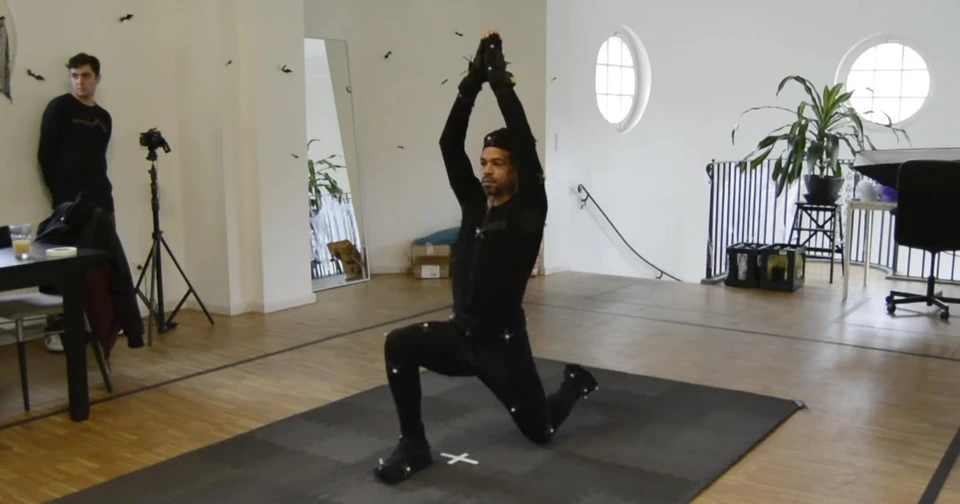
Motion Capture vs Keyframe Animation for Fitness Apps
Compare motion capture vs keyframe animation for fitness apps. Explore cleanup, retargeting, costs, delivery requirements and a practical production brief.
Read article
AI Fitness Coach: Benefits, Limits and How It Works
Understand AI fitness-coach features, movement-data limitations and human oversight. Compare intended capabilities with evidence for a specific product.
Read article
Comments