
Motion Capture vs Keyframe Animation for Fitness Apps
Compare motion capture vs keyframe animation for fitness apps. Explore cleanup, retargeting, costs, delivery requirements and a practical production brief.
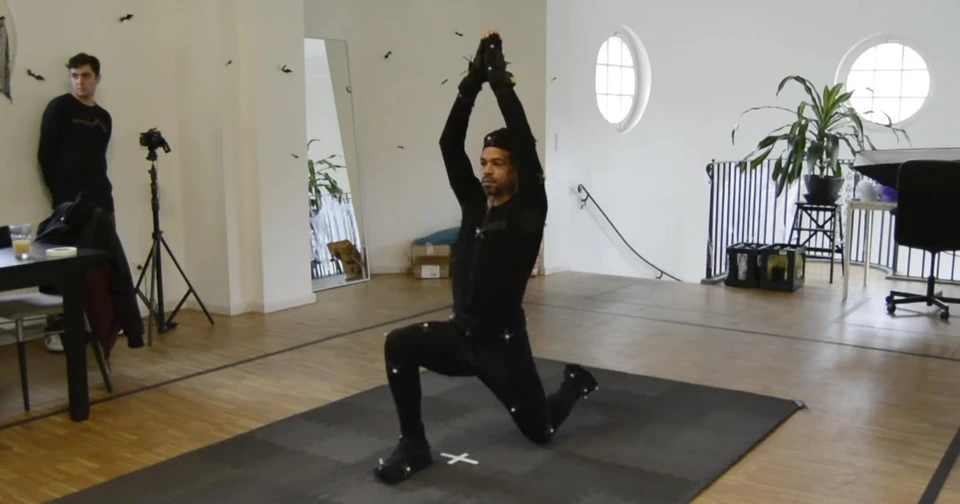
Should your fitness app use motion capture, keyframe animation or both?
Motion capture records a performer's movement; keyframe animation builds movement from poses and timing set by an animator. For a fitness app, the useful choice depends on the exercise library, character, delivery format and review requirements. A hybrid workflow can combine recorded performance with hand-authored corrections, but it still needs testing on the final character and device.
This guide compares motion capture vs keyframe animation for teams commissioning exercise demonstrations. It covers production decisions rather than workout advice: how to choose a method, review movement, control scope and accept usable assets. Our fitness animation service brings these questions together around an agreed production brief.
Table of Contents
Motion capture vs keyframe animation: the practical difference
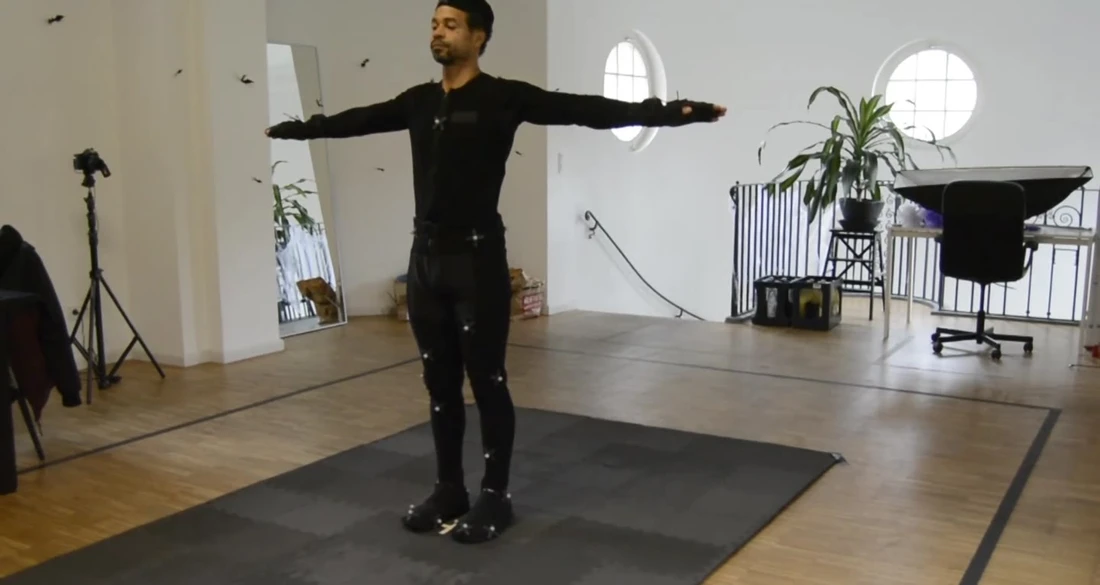
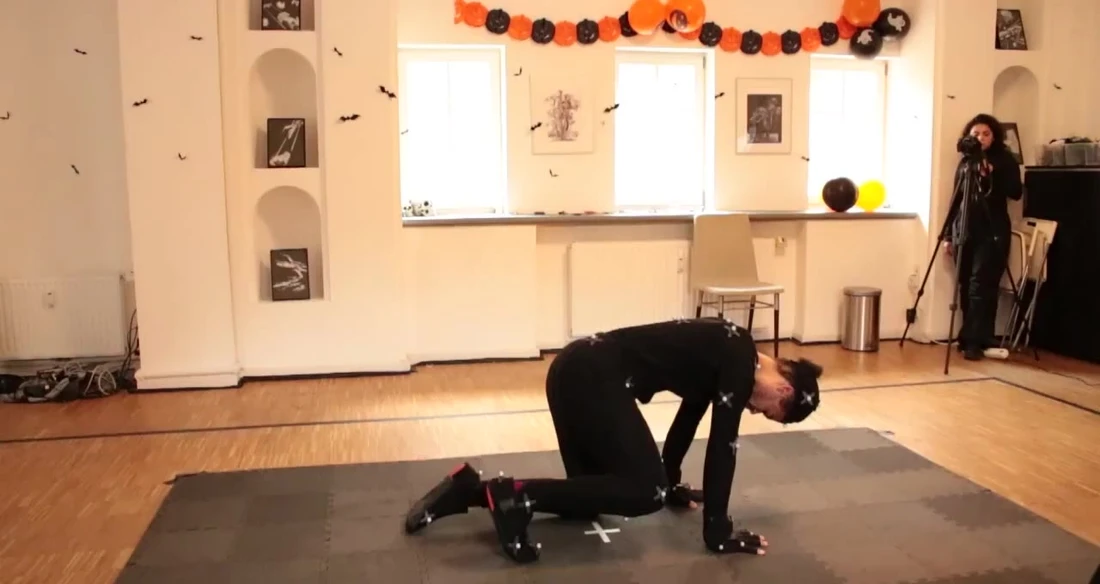
Motion capture starts with a performance. A capture system records movement that can be processed into animation for a digital character. The studio images in this article show marker-based recording: the visible markers belong to the capture setup. Other capture approaches use different equipment. A reference camera recording and a finished, cleaned animation are different deliverables.
Keyframe animation starts with authored poses. An animator sets values at chosen moments, then shapes the movement between them. The Blender manual's explanation of keyframes describes this relationship between stored values and interpolation. Software fills the intervals; the animator remains responsible for whether the resulting pose changes communicate the intended action.
Neither method automatically delivers a finished exercise clip. Captured data may need cleanup and adaptation. Keyframed movement may need reference, additional poses and timing changes. Both depend on a suitable character rig: the controls and skeleton that let the character move. If your project also needs a character, compare the requirements for custom virtual fitness coach production before treating animation as a separate purchase.
For a buyer, the important distinction is where the movement begins and where correction effort sits. Capture can retain details of an individual performance, including weight shifts and transitions. Keyframing gives the animator direct control over pose, emphasis and timing. Neither label tells you whether the resulting demonstration will be clear from your app's camera angle.
Ask to compare representative samples on the same target character, at the intended screen size. A studio reel can demonstrate craft, but it does not establish how your own rig, movement list or playback system will behave. Our production technology page provides context for the character and performance work behind those assets.
Choose a method around the movement library
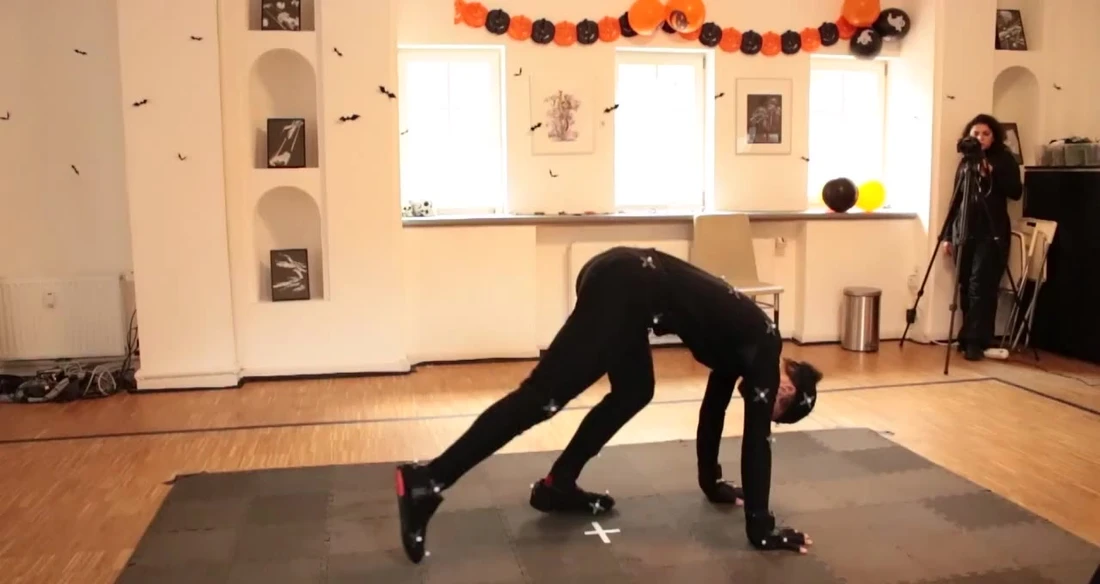
Consider motion capture when performance continuity matters. A library containing linked actions, weight transfers or longer sequences may benefit from a performed starting point. That is a reason to test capture, not a promise that it will always be faster. Floor contact, equipment, visibility and the capture setup can change the amount of processing and cleanup required.
Consider keyframing when controlled presentation matters most. A small set of stylised demonstrations, deliberately timed holds or movements that need substantial adaptation to a character may suit an authored approach. The team can plan the key poses around the intended view. Natural-looking timing and convincing balance still require care; manual control is not a shortcut around movement review.
Consider a hybrid when the first pass is useful but incomplete. A recorded sequence might supply the overall performance while an animator refines a hand position, adjusts a hold or builds a transition. Autodesk describes moving motion-capture work between applications and refining animation with layers in its HumanIK documentation. Your studio should explain which parts of the proposed job are captured, authored and reviewed.
Take a hypothetical library of standing, floor-based and equipment-assisted movements. Do not approve the whole library from one uncomplicated standing clip. Select a sample that exposes the difficult requirements: changing support points, overlapping limbs, a prop grip or a transition into a hold. This commissioning example is a test plan, not an exercise programme or a claim about an existing client project.
Separate character production from movement production when comparing examples. The Spark Fitness project documents character creation, modelling, texturing and rigging for Luni's app. It should not be presented as evidence that every movement used motion capture, or that the work produced a measured training benefit. The broader AI avatar services describe how character and interaction requirements can be scoped together.
Review retargeting, contacts, loops and app playback
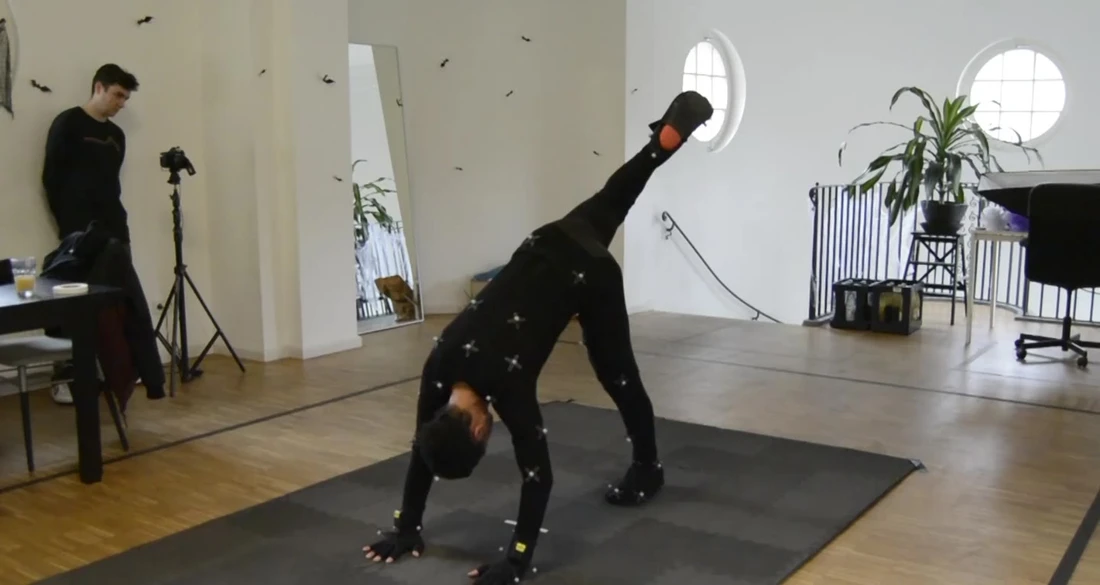
Retargeting transfers animation between characters; it does not remove the need for review. Different proportions, joint placement and rig conventions can change the result. Autodesk's retargeting workflow separates character setup, transfer, adjustment and optional baking. Ask your team to test the actual target rig early, rather than checking only the capture skeleton.
Start with contact points. Does a planted foot drift? Do hands reach the intended support surface? Does the body intersect a prop or the floor? Epic's foot-sliding documentation identifies differing leg lengths and stances as potential causes of retargeting problems. Inspect the complete movement, including entry and exit, because a convincing single frame can conceal a poor transition.
Treat repetitions and holds as separate review questions. A repeat should connect without an unintended snap, but not every action should loop. A held pose may need a deliberate duration and a clear exit. Unity's loop-optimisation guidance explains why matching the relevant start and end properties matters. Test the loop at normal playback speed, not only by scrubbing a timeline.
Agree whether the animation moves the character through space or plays in place while the application controls position. That choice affects integration and transitions. Unity explains this separation in its root-motion documentation. Confirm the convention with your developer; avoid assuming that an imported file will behave like the studio preview.
Finally, review the delivered asset on a representative device. A rendered video and a real-time animated character have different delivery needs. Compression can reduce animation memory use, but settings must be checked against visible movement quality; Epic discusses that trade-off in its animation-compression guidance. Use the final camera, playback controls and character materials when judging clarity. Projects involving interactive spaces can also draw on the requirements outlined in our 3D simulations service.
Build a brief that makes proposals comparable
Start with a movement list and a representative pilot. Identify the intended audience, application platform, character availability and delivery format. Describe what the viewer needs to see. A tutorial requiring a fixed side view is a different brief from an interactive character that users can rotate. If the experience uses a headset, our VR yoga guide discusses additional experience-design considerations.
Include these decisions before asking for a production estimate:
Movement scope: named clips, entries, exits, repetitions, holds and required variants.
Character readiness: model, rig, proportions, sample animation and rights to supplied assets.
Approval responsibilities: who approves the programme, the demonstrated technique and the visual production.
Delivery package: rendered videos or animation assets, agreed formats, naming, scale, frame rate and root-motion convention.
Review process: pilot acceptance criteria, feedback rounds, decision owners and how changes will be scoped.
Rights and maintenance: performer permissions, intended distribution, editable source files and arrangements for future updates.
Compare the total path to an accepted clip. Capture setup, performer direction, retargeting, cleanup and export are different tasks from keyframe posing, timing and refinement. Either route may also need rig preparation and application testing. A quote based only on capture time or animation seconds can hide work that determines whether the assets are usable.
Make acceptance practical. For example, require the pilot to import on the agreed rig, play at the intended speed, preserve named contact points and connect to the planned start or finish state. Record which issues are visual production defects and which are requests to change the approved movement. This distinction helps reviewers give clear feedback instead of repeatedly reopening the brief.
A qualified movement specialist should approve the exercise content and technique for the intended use. Animation production does not certify a routine for every user, diagnose movement or validate an automated coaching system. A demonstration library and a system that assesses a user's live movement require different evidence and testing. Our AI fitness coach guide explains why those boundaries matter.
Frequently asked questions
Is motion capture better than keyframe animation for fitness apps?
Neither is universally better. Motion capture can provide a performed starting point for connected movement; keyframing offers direct control over poses and timing. Choose using representative clips, the final character and the intended playback format. A hybrid may be useful when captured performance needs deliberate adaptation. Judge the reviewed result, rather than assuming the production method determines quality.
Is motion capture always cheaper for a large exercise library?
No. Recording many movements in one session may be useful, but setup, performer requirements, capture difficulty, retargeting and cleanup affect the total scope. A small keyframed set can have a different cost structure. Ask for an estimate that includes accepted delivery, not only capture time, and use a pilot to expose the work needed for your specific library.
Can keyframe animation look natural enough for exercise demonstrations?
It can, provided the poses, timing, transitions and character deformation are developed and reviewed carefully. Software interpolation alone does not establish convincing balance or clear technique. Agree references and camera views with the animator, then have the appropriate movement specialist review the demonstration. The required level of realism should follow the audience and purpose of the app.
Can motion-capture animation be edited afterwards?
Yes. Captured movement can be refined in an animation workflow, subject to the supplied data, rig and agreed scope. Edits may address contacts, holds, transitions or a character's proportions. Clarify whether the delivery includes only finished clips or also editable source material. Substantial changes to an approved movement can require further work rather than a simple playback adjustment.
Can the same animation work on different fitness avatars?
Sometimes, through retargeting, but compatibility and quality need testing. Differences in proportions, skeleton definitions and rig behaviour can affect reaches, contacts and deformation. Supply the intended characters before the pilot. Request review on each relevant target rather than treating one successful import as proof that every avatar will play the movement equally well.
Should a fitness app use video clips or real-time character animation?
That depends on the experience. Rendered clips provide predetermined views and playback. Real-time characters can support application-controlled views and interactions, but require suitable assets and integration. Decide what users actually need to control before choosing. Discuss device constraints, delivery formats and maintenance with the development team; neither option is automatically preferable for every app.
Does recording a qualified performer make the animation medically validated?
No. A recorded performance and a digital demonstration do not establish clinical effectiveness or suitability for every person. Retargeting and editing can also change how movement is presented. Define qualified content approval and the intended audience separately from production checks. Avoid describing animation assets as validated rehabilitation or personalised exercise advice without appropriate evidence and oversight.
What should we send a studio before requesting a quote?
Send the movement list, intended platform, available character and rig, representative references, delivery needs and approval responsibilities. Add schedule, budget range and known rights restrictions where available. Mark unresolved decisions clearly. A small representative pilot lets the team assess production and integration requirements before committing to the full library. For the character and export specification, use the fitness avatar production checklist.
Conclusion
The useful motion capture vs keyframe animation decision is about producing clear, reviewable movement assets for a particular app. Begin with representative actions, test the final character and agree the delivery conventions. Choose capture, keyframes or a hybrid according to that evidence, then scale the workflow after the pilot meets its acceptance criteria.
Discuss your fitness animation brief with Mimic Wellbeing. Share the movement list, target platform and available character assets so the team can scope the production approach and review process.
Should your fitness app use motion capture, keyframe animation or both?
Motion capture records a performer's movement; keyframe animation builds movement from poses and timing set by an animator. For a fitness app, the useful choice depends on the exercise library, character, delivery format and review requirements. A hybrid workflow can combine recorded performance with hand-authored corrections, but it still needs testing on the final character and device.
This guide compares motion capture vs keyframe animation for teams commissioning exercise demonstrations. It covers production decisions rather than workout advice: how to choose a method, review movement, control scope and accept usable assets. Our fitness animation service brings these questions together around an agreed production brief.
Table of Contents
Motion capture vs keyframe animation: the practical difference
Motion capture starts with a performance. A capture system records movement that can be processed into animation for a digital character. The studio images in this article show marker-based recording: the visible markers belong to the capture setup. Other capture approaches use different equipment. A reference camera recording and a finished, cleaned animation are different deliverables.
Keyframe animation starts with authored poses. An animator sets values at chosen moments, then shapes the movement between them. The Blender manual's explanation of keyframes describes this relationship between stored values and interpolation. Software fills the intervals; the animator remains responsible for whether the resulting pose changes communicate the intended action.
Neither method automatically delivers a finished exercise clip. Captured data may need cleanup and adaptation. Keyframed movement may need reference, additional poses and timing changes. Both depend on a suitable character rig: the controls and skeleton that let the character move. If your project also needs a character, compare the requirements for custom virtual fitness coach production before treating animation as a separate purchase.
For a buyer, the important distinction is where the movement begins and where correction effort sits. Capture can retain details of an individual performance, including weight shifts and transitions. Keyframing gives the animator direct control over pose, emphasis and timing. Neither label tells you whether the resulting demonstration will be clear from your app's camera angle.
Ask to compare representative samples on the same target character, at the intended screen size. A studio reel can demonstrate craft, but it does not establish how your own rig, movement list or playback system will behave. Our production technology page provides context for the character and performance work behind those assets.
Choose a method around the movement library
Consider motion capture when performance continuity matters. A library containing linked actions, weight transfers or longer sequences may benefit from a performed starting point. That is a reason to test capture, not a promise that it will always be faster. Floor contact, equipment, visibility and the capture setup can change the amount of processing and cleanup required.
Consider keyframing when controlled presentation matters most. A small set of stylised demonstrations, deliberately timed holds or movements that need substantial adaptation to a character may suit an authored approach. The team can plan the key poses around the intended view. Natural-looking timing and convincing balance still require care; manual control is not a shortcut around movement review.
Consider a hybrid when the first pass is useful but incomplete. A recorded sequence might supply the overall performance while an animator refines a hand position, adjusts a hold or builds a transition. Autodesk describes moving motion-capture work between applications and refining animation with layers in its HumanIK documentation. Your studio should explain which parts of the proposed job are captured, authored and reviewed.
Take a hypothetical library of standing, floor-based and equipment-assisted movements. Do not approve the whole library from one uncomplicated standing clip. Select a sample that exposes the difficult requirements: changing support points, overlapping limbs, a prop grip or a transition into a hold. This commissioning example is a test plan, not an exercise programme or a claim about an existing client project.
Separate character production from movement production when comparing examples. The Spark Fitness project documents character creation, modelling, texturing and rigging for Luni's app. It should not be presented as evidence that every movement used motion capture, or that the work produced a measured training benefit. The broader AI avatar services describe how character and interaction requirements can be scoped together.
Review retargeting, contacts, loops and app playback
Retargeting transfers animation between characters; it does not remove the need for review. Different proportions, joint placement and rig conventions can change the result. Autodesk's retargeting workflow separates character setup, transfer, adjustment and optional baking. Ask your team to test the actual target rig early, rather than checking only the capture skeleton.
Start with contact points. Does a planted foot drift? Do hands reach the intended support surface? Does the body intersect a prop or the floor? Epic's foot-sliding documentation identifies differing leg lengths and stances as potential causes of retargeting problems. Inspect the complete movement, including entry and exit, because a convincing single frame can conceal a poor transition.
Treat repetitions and holds as separate review questions. A repeat should connect without an unintended snap, but not every action should loop. A held pose may need a deliberate duration and a clear exit. Unity's loop-optimisation guidance explains why matching the relevant start and end properties matters. Test the loop at normal playback speed, not only by scrubbing a timeline.
Agree whether the animation moves the character through space or plays in place while the application controls position. That choice affects integration and transitions. Unity explains this separation in its root-motion documentation. Confirm the convention with your developer; avoid assuming that an imported file will behave like the studio preview.
Finally, review the delivered asset on a representative device. A rendered video and a real-time animated character have different delivery needs. Compression can reduce animation memory use, but settings must be checked against visible movement quality; Epic discusses that trade-off in its animation-compression guidance. Use the final camera, playback controls and character materials when judging clarity. Projects involving interactive spaces can also draw on the requirements outlined in our 3D simulations service.
Build a brief that makes proposals comparable
Start with a movement list and a representative pilot. Identify the intended audience, application platform, character availability and delivery format. Describe what the viewer needs to see. A tutorial requiring a fixed side view is a different brief from an interactive character that users can rotate. If the experience uses a headset, our VR yoga guide discusses additional experience-design considerations.
Include these decisions before asking for a production estimate:
Movement scope: named clips, entries, exits, repetitions, holds and required variants.
Character readiness: model, rig, proportions, sample animation and rights to supplied assets.
Approval responsibilities: who approves the programme, the demonstrated technique and the visual production.
Delivery package: rendered videos or animation assets, agreed formats, naming, scale, frame rate and root-motion convention.
Review process: pilot acceptance criteria, feedback rounds, decision owners and how changes will be scoped.
Rights and maintenance: performer permissions, intended distribution, editable source files and arrangements for future updates.
Compare the total path to an accepted clip. Capture setup, performer direction, retargeting, cleanup and export are different tasks from keyframe posing, timing and refinement. Either route may also need rig preparation and application testing. A quote based only on capture time or animation seconds can hide work that determines whether the assets are usable.
Make acceptance practical. For example, require the pilot to import on the agreed rig, play at the intended speed, preserve named contact points and connect to the planned start or finish state. Record which issues are visual production defects and which are requests to change the approved movement. This distinction helps reviewers give clear feedback instead of repeatedly reopening the brief.
A qualified movement specialist should approve the exercise content and technique for the intended use. Animation production does not certify a routine for every user, diagnose movement or validate an automated coaching system. A demonstration library and a system that assesses a user's live movement require different evidence and testing. Our AI fitness coach guide explains why those boundaries matter.
Frequently asked questions
Is motion capture better than keyframe animation for fitness apps?
Neither is universally better. Motion capture can provide a performed starting point for connected movement; keyframing offers direct control over poses and timing. Choose using representative clips, the final character and the intended playback format. A hybrid may be useful when captured performance needs deliberate adaptation. Judge the reviewed result, rather than assuming the production method determines quality.
Is motion capture always cheaper for a large exercise library?
No. Recording many movements in one session may be useful, but setup, performer requirements, capture difficulty, retargeting and cleanup affect the total scope. A small keyframed set can have a different cost structure. Ask for an estimate that includes accepted delivery, not only capture time, and use a pilot to expose the work needed for your specific library.
Can keyframe animation look natural enough for exercise demonstrations?
It can, provided the poses, timing, transitions and character deformation are developed and reviewed carefully. Software interpolation alone does not establish convincing balance or clear technique. Agree references and camera views with the animator, then have the appropriate movement specialist review the demonstration. The required level of realism should follow the audience and purpose of the app.
Can motion-capture animation be edited afterwards?
Yes. Captured movement can be refined in an animation workflow, subject to the supplied data, rig and agreed scope. Edits may address contacts, holds, transitions or a character's proportions. Clarify whether the delivery includes only finished clips or also editable source material. Substantial changes to an approved movement can require further work rather than a simple playback adjustment.
Can the same animation work on different fitness avatars?
Sometimes, through retargeting, but compatibility and quality need testing. Differences in proportions, skeleton definitions and rig behaviour can affect reaches, contacts and deformation. Supply the intended characters before the pilot. Request review on each relevant target rather than treating one successful import as proof that every avatar will play the movement equally well.
Should a fitness app use video clips or real-time character animation?
That depends on the experience. Rendered clips provide predetermined views and playback. Real-time characters can support application-controlled views and interactions, but require suitable assets and integration. Decide what users actually need to control before choosing. Discuss device constraints, delivery formats and maintenance with the development team; neither option is automatically preferable for every app.
Does recording a qualified performer make the animation medically validated?
No. A recorded performance and a digital demonstration do not establish clinical effectiveness or suitability for every person. Retargeting and editing can also change how movement is presented. Define qualified content approval and the intended audience separately from production checks. Avoid describing animation assets as validated rehabilitation or personalised exercise advice without appropriate evidence and oversight.
What should we send a studio before requesting a quote?
Send the movement list, intended platform, available character and rig, representative references, delivery needs and approval responsibilities. Add schedule, budget range and known rights restrictions where available. Mark unresolved decisions clearly. A small representative pilot lets the team assess production and integration requirements before committing to the full library. For the character and export specification, use the fitness avatar production checklist.
Conclusion
The useful motion capture vs keyframe animation decision is about producing clear, reviewable movement assets for a particular app. Begin with representative actions, test the final character and agree the delivery conventions. Choose capture, keyframes or a hybrid according to that evidence, then scale the workflow after the pilot meets its acceptance criteria.
Discuss your fitness animation brief with Mimic Wellbeing. Share the movement list, target platform and available character assets so the team can scope the production approach and review process.
General information about technology and wellbeing, not personal medical advice. Read our editorial policy.
Continue exploring.

VR Yoga: Benefits, Safety and How Virtual Practice Works
Learn how VR yoga works, its potential benefits, safe setup, accessible practice design and responsible use for home and organizational wellness.
Read article
AI Fitness Coach: Benefits, Limits and How It Works
Understand AI fitness-coach features, movement-data limitations and human oversight. Compare intended capabilities with evidence for a specific product.
Read article
Comments